Never Reformat an SD Card Again
Import Magic detects duplicates across your entire system, organizes files automatically, and remembers your settings — so you can focus on creating
Manual Drag & Drop
Tedious, error-prone, time-consuming
Import Magic
Automatic, reliable, instant
🎯 Smart Duplicate Detection
Searches your entire computer for duplicates — not just the target folder. Never waste time reformatting again.
⚙️ Customize Once, Use Forever
Filter file types, organize by date, sort into subfolders. Set it up once, and every future import is automatic.
💾 Multiple Drive Backup
Copy to multiple backup drives simultaneously. Save hours and ensure your files are protected.
Start with 10 free imports. Upgrade to Pro for unlimited imports anytime.
No credit card needed • Works on Windows & Mac
Why Drag & Drop Isn't Pro Enough
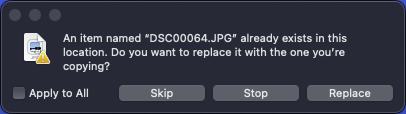
We're all familiar with this dialog, but it only works with the file you're dragging to. Import Magic works across every single file.
The real pain: Tediously dragging and dropping to your editing drive, backup drives. Manually reformatting SD cards and checking duplicates. Hours wasted.
With Import Magic: Checks every single file and detects new files, automatically import to multiple drives at the same time. Never format an SD card again.
Ready to Stop Wasting Time on File Management?
Download Import Magic and get started with 10 free imports. No credit card required.
Start with 10 free imports. Upgrade to Pro for unlimited imports anytime.
Complete Import Confidence.
See every file, track every step, backup everywhere — all at the same time.
Live Import Progress
Watch every single file import in real-time with detailed progress tracking and transfer speeds
100% Peace of Mind
Always know exactly which files have been imported and never worry about missing anything
Multiple Destinations
Backup to multiple drives simultaneously — no more copying files twice
Never Wonder "Did Everything Import?" Again
With Import Magic's comprehensive tracking and multiple destination support, you'll always know your files are completely safe and exactly where they should be.
Watch Import Magic Handle Millions of Files.
Customize Your Import Organization
Stop settling for messy imports. Organize your files exactly how you want them with powerful customization options.
Transform Messy Imports Into Perfect Organization
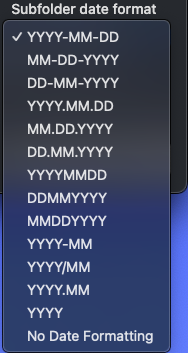
Date Formats
Organize by year, month, day in any format you prefer
Project Folders
Create custom project folders for different clients or shoots
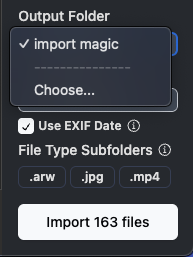
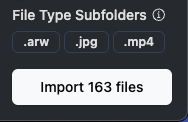
Subfolder Sorting
Automatically sort files into subfolders by file type
Smart Filtering
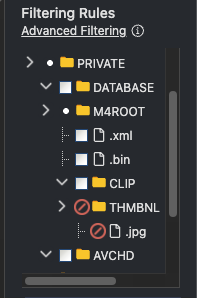
Ignore specific files or folders you don't want imported
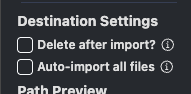
Automatic Date Prefixing
Flip one switch to prepend capture dates (YYYY-MM-DD) to every filename so Finder, Explorer, and editing apps stay perfectly sorted.
Every setting saves to save you more time
Select Auto-import and Date Prefix once and you don't need to lift a finger
Get Started in 8 Simple Steps
See exactly how Import Magic works with this step-by-step tutorial
Select a source.
Plug in your SD card or drive and wait for it to appear in devices. Or click add source to select any folder on your computer.
Start processing.
External drives, SD Cards, and cameras will start off as inactive. Click the toggle next to the source you want to start processing.
Confirm the Process.
A dialog will pop up asking you to confirm to begin processing.
Select Your Destination
Choose where you want your files to be imported to. Note: It's best to select a folder that contains most or all of your videos and pictures.
Select the folder as the destination
In the folder picker, confirm to select the folder as the destination
Select Files to Import
Import Magic will automatically select all the new files for you. You can toggle files on and off or use the sidebar to quickly select and unselect files by file type, ignore certain file types with advanced filtering, turn on auto import, and customize your output folder to organize by file date and file type.
Press Import
Hit the import button and watch the magic happen
Done!
Your files are safely imported and your destination folder opens automatically.
What's next
As a content creator, I am building exactly what I need to eliminate the most annoying parts of content creation. This is what's coming down the pipeline:
Media Library – View all of your photos, videos, audio, files in one place
AI Media Library – Search all your photos, videos, audio, and files with AI
AI assisted culling
Easy export to Adobe Lightroom/Classic, Capture One, etc
Every purchase supports me to continue making this.
Supporting Import Magic now will let you help shape the direction of these upcoming features.
Start with 10 free imports. Upgrade to Pro for unlimited imports anytime.
Your Feedback Shapes Import Magic
As a fellow creator, I'm continually working to improve Import Magic. Your feedback, ideas, and input are extremely valuable.
Join the Import Magic Discord
Connect with other creators, share your workflow, get help, and help shape the future of Import Magic.
Join Discord Community